Seven epic games. We're ready to drop seven new cross-platform, DRM-free games down your digital chimney. Bandage your fingertips and prepare your mind for the challenges of Super Meat Boy, Shank, Jamestown, Bit.Trip Runner, and NightSky. If you pay more than the average price, you'll also get two massive, well-loved indie favorites: Cave Story+ and Gratuitous Space Battles.
Pay what you want. If you bought these games separately, it would cost around $100, but we are letting you set the price.
The games work great on Mac, Windows, and Linux (system requirements here). Please note that this is the initial release of seven Linux builds, so please be patient while we fix 1.0 issues as fast as we can.
You can support charity. Choose exactly how your purchase is divided: between the developers, the Child's Play Charity, or the American Red Cross. Also, if you like this deal, a tip to Humble Bundle would be much appreciated!
you want it click here
Wednesday, December 14, 2011

Friday, November 5, 2010
An Awesome Torrent Application for your ubuntu That Support web and have a nice webGUI
Deluge is a full-featured BitTorrent client for Linux, OS X, Unix and Windows. It uses libtorrent in it's backend and features multiple user-interfaces including: GTK+, web and console. It has been designed using the client server model with a daemon process that handles all the bittorrent activity. The Deluge daemon is able to run on headless machines with the user-interfaces being able to connect remotely from any platform.
Deluge features a rich plugin collection; in fact, most of Deluge's functionality is available in the form of plugins.
Deluge was created with the intention of being lightweight and unobtrusive. It is our belief that downloading shouldn't be the primary task on your computer and therefore shouldn't monopolize system resources.
here is some screenshoot on how it looks on ubuntu 10.4 and also show a webgui screenshoot


to download it inside your ubuntu just copy and paste the following 2 lines in your terminal
sudo add-apt-repository ppa:deluge-team/ppa
sudo apt-get update && sudo apt-get install deluge
Deluge features a rich plugin collection; in fact, most of Deluge's functionality is available in the form of plugins.
Deluge was created with the intention of being lightweight and unobtrusive. It is our belief that downloading shouldn't be the primary task on your computer and therefore shouldn't monopolize system resources.
here is some screenshoot on how it looks on ubuntu 10.4 and also show a webgui screenshoot


to download it inside your ubuntu just copy and paste the following 2 lines in your terminal
sudo add-apt-repository ppa:deluge-team/ppa
sudo apt-get update && sudo apt-get install deluge
Wednesday, November 3, 2010
ubuntu 10.10 First Look
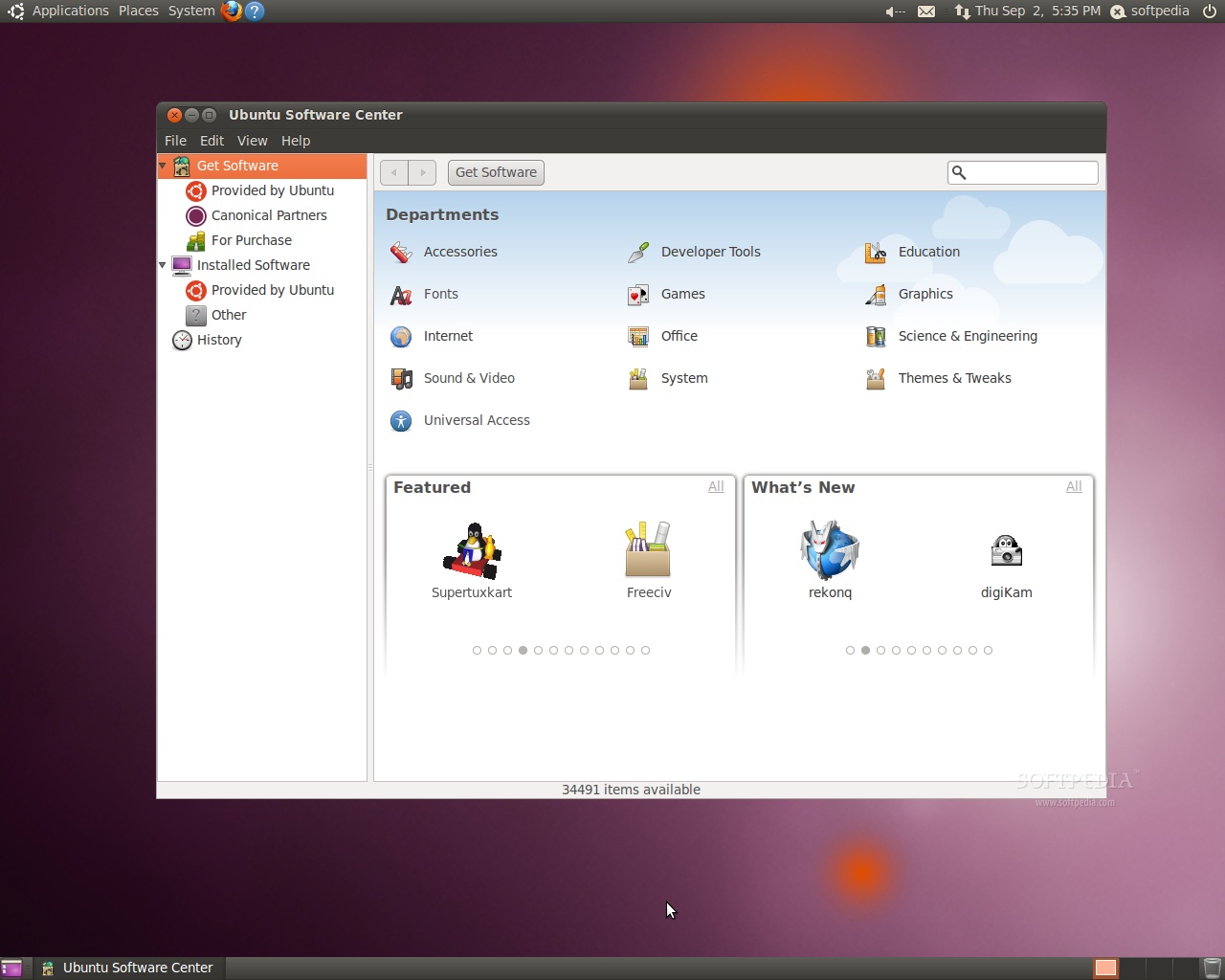
Recently ubuntu 10.10 was released, and i didn't have the time to test it in that time,recently i did install it to my friend and i found that it is really fast and really clean in the design.now to the new things in ubuntu 10.01, first the ubuntu software center has been changed for better i think more applications and centralized management, this can be seen while users use it. also ubuntu 10.10 introduce kernel 35 which support more hardware. also the installer has been update now there is a new installer which can let you install ubuntu with the latest updates and it also enable users to install third party software such as codecs and plugins needed for multimedia play back.
the following pictures will summarize the what we were talking about


also here is a video show how is the new installer look like
the following pictures will summarize the what we were talking about

also here is a video show how is the new installer look like
Securing & Optimizing Linux: The Hacking Solution (v.3.0) (Free PDF Guide)

while i was browsing the net for the new Linux related news i found this e-book which is 800+ pages that talk about security tools that been used in Linux. this book have a clear and deep description on how to safely configure and used these tools in Linux environment and it is also free to download, so just click here to download
Saturday, March 27, 2010
Full Cricle Magazine issue 35 OUT
Today full circle magazine announce the availability of the new issue 35 of there ubuntu magazine here some headlines from the new issue:
[Magazine]
We've got a review of the coveted Motorola Droid (Milestone for those of you in Europe), an Android app review, as well as tips on running Google Sketchup in Wine for you. In addition to all that, we have:
* Command and Conquer.
* How-To : Program in Python – Part 9, Digitally Retouching a Photo in GIMP – Part 2, and Installing Google SketchUp using Wine.
* Review – Motorola Milestone/Droid.
* MOTU Interview – Pedro Fragoso.
* Top 5 – Android Applications.
* Ubuntu Women, Ubuntu Games, My Opinion, My Story, and all the usual goodness!
Get it here
[Magazine]
We've got a review of the coveted Motorola Droid (Milestone for those of you in Europe), an Android app review, as well as tips on running Google Sketchup in Wine for you. In addition to all that, we have:
* Command and Conquer.
* How-To : Program in Python – Part 9, Digitally Retouching a Photo in GIMP – Part 2, and Installing Google SketchUp using Wine.
* Review – Motorola Milestone/Droid.
* MOTU Interview – Pedro Fragoso.
* Top 5 – Android Applications.
* Ubuntu Women, Ubuntu Games, My Opinion, My Story, and all the usual goodness!
Get it here
Friday, March 5, 2010
Take a look on the comming relese ubuntu 10.4
yesterday ubuntu has revealed there new awesome theme for the next ubuntu OS here is some screen shot from my Virtualbox:

Download
For the impatient or those Karmic users wishing to see if the themes will work for them, here are the necessary .debs files to get you going.
Themes @ launchpad.net//light-themes_0.1.5.2_all.deb
Icons @ http://launchpadlibrarian.net/40195509/ubuntu-mono_0.0.6_all.deb

 |
| From Blogger Pictures |
Download
For the impatient or those Karmic users wishing to see if the themes will work for them, here are the necessary .debs files to get you going.
Themes @ launchpad.net//light-themes_0.1.5.2_all.deb
Icons @ http://launchpadlibrarian.net/40195509/ubuntu-mono_0.0.6_all.deb
Monday, March 1, 2010
Songbird a very powerfull and cool music player very unique

Songbird is a free and open source software audio player and web browser founded by Rob Lord and developed by Pioneers of the Inevitable (with members who previously developed for both Winamp[2] and the Yahoo! Music Engine), with a stated mission "to incubate Songbird, the first Web player, to catalyze and champion a diverse, open Media Web.

Songbird utilizes the cross-platform frameworks, Mozilla's XULRunner and GStreamer media framework, and is thus capable of running on Microsoft Windows, Apple Mac OS X, Solaris and Linux.
This music player is so unique since it is based on the Mozilla project it has its potential such as plug-ins and powerful web browser built inside it.
Prerequisite on ubuntu machine:
* glibc 2.3.4 or later
* XOrg 1.0 or later
* gtk+2.10 or later
* fontconfig (also known as xft)
* libstdc++6
* 1.5 GHz Pentium 4 or comparable
* At least 512 MB of physical RAM
* At least 100 MB of available space on your hard drive
* 16 bit sound card (Recommended: 32-bit Sound Card)
* Speakers or headphones
you just need to download the application from there website. then extract the file and run double click on songbird file and thats it.
note: if it does not work try to enter this command in the terminal and then try to launch the program again:
sudo mv /usr/lib/python2.6/dist-packages/gst-0.10/ /usr/lib/python2.6/dist-packages/gst-0.10_badEnjoy
Saturday, February 27, 2010
Ubuntu Magazine issue 34 Check it Out

This month marks the 34th issue of Full Circle, along with the new and improved companion Full Circle Podcast! Now, along with your magazine, you've got an extra 40 minutes of auditory Full Circle goodness. Just click the podcast link on the site and take a listen.
In the magazine:
Command and Conquer.
How-To : Program in Python - Part 8, Digitally Retouching a Photo in GIMP, and The Perfect Server - Part 4.
My Story - a Linux User, and Powerpets.
Review - Acer UL30-A laptop.
MOTU Interview - Roderick Greening.
Top 5 - Reference Tools.
Ubuntu Women, Ubuntu Games, My Opinion, and all the usual goodness!
Download it here:
Grab the companion podcast:
Enjoy!
Thursday, February 18, 2010
KDE 4.4 Really Awesome, look at it


First of all what is KDE?
KDE is an international team co-operating on development and distribution of Free, Open Source Software for desktop and portable computing. Our community has developed a wide variety of applications for communication, work, education and entertainment. We have a strong focus on finding innovative solutions to old and new problems, creating a vibrant, open atmosphere for experimentation.
What makes KDE so exciting?
The best thing about KDE is our amazing community! We are open to new members, offering help and allowing them to experiment, learn and grow. Our products are used by millions of home and office workers, and are being deployed in schools around the world - Brazil alone has over 50 million school children using KDE-based software to browse, learn and communicate!
What does KDE produce?
For users on Linux and Unix, KDE offers a full suite of user workspace applications which allow interaction with these operating systems in a modern, graphical user interface. This includes Plasma Desktop, KDE's innovative desktop interface. Other workspace applications are included to aid with system configuration, running programs, or interacting with hardware devices. While the fully integrated KDE Workspaces are only available on Linux and Unix, some of these features are available on other platforms.
In addition to the workspace, KDE produces a number of key applications such as the Konqueror web browser, Dolphin file manager and Kontact, the comprehensive personal information management suite. However, our list of applications includes many others, including those for education, multimedia, office productivity, networking, games and much more. Most applications are available on all platforms supported by the KDE Development.
KDE also brings to the forefront many innovations for application developers. An entire infrastructure has been designed and implemented to help programmers create robust and comprehensive applications in the most efficient manner, eliminating the complexity and tediousness of creating highly functional applications.
It is our hope and continued ambition that the KDE team will bring open, reliable, stable and monopoly-free computing to the everyday user.
for more info and videos on the new KDE 4.4 click here
Tuesday, February 16, 2010
GNU/Linux Advanced Administration Free book
GNU/Linux Advanced Administration
* Authors: Remo Suppi Boldrito, Josep Jorba Esteve
* Coordinator: Josep Jorba Esteve
* Licenses: GNU Free Documentation License, Creative Commons Attribute ShareAlike License
* Information: 545 Pages; 18.8 Mb

This what they write in there website:
Click here to go to there website
* Authors: Remo Suppi Boldrito, Josep Jorba Esteve
* Coordinator: Josep Jorba Esteve
* Licenses: GNU Free Documentation License, Creative Commons Attribute ShareAlike License
* Information: 545 Pages; 18.8 Mb
This what they write in there website:
The GNU/Linux systems have reached an important level of maturity, allowing to integrate them in almost any kind of work environment, from a desktop PC to the sever facilities of a big company.
In the module called "The GNU/Linux operating system", the main contents are related with system administration. This book is the main documentation for the module.
We will learn how to install and configure several computer services, and how to optimise and synchronise the resources.
The activities that will take place in this module cover the studied topics in a practical approach, applying these concepts in real GNU/Linux systems.
You can help us distribute this book if you download it via BitTorrent:
Click here to go to there website
10 Great Open Source Software

#1: Inkscape ( Vector Graphics Editor )

Fig.01: Inkscape is used by artist/illustrator/designer as vector graphics editor
Inkscape is a vector graphics editor. It is similar to Illustrator, CorelDraw, and Xara X. This is perfect for object manipulation and styling objects. From the project home page:
Inkscape supports many advanced SVG features (markers, clones, alpha blending, etc.) and great care is taken in designing a streamlined interface. It is very easy to edit nodes, perform complex path operations, trace bitmaps and much more. We also aim to maintain a thriving user and developer community by using open, community-oriented development.Download
#2: 7-Zip (Archiver)

Fig.02: 7-Zip is used as archiver
7-Zip is a file archiver and open source software. No need to use winzip or anything else. It does everything for you without paying a single penny:
1. Supports many formats:
* Packing / unpacking: 7z, ZIP, GZIP, BZIP2 and TAR
* Unpacking only: ARJ, CAB, CHM, CPIO, DEB, DMG, HFS, ISO, LZH, LZMA, MSI, NSIS,
RAR, RPM, UDF, WIM, XAR and Z.
2. Fast.
3. Free and open source.
4. High compression ratio.
5. Works best with Windows operating systems.
Download
#3: VLC ( Media Player ):

Fig.03: VLC is similar to QuickTime / Windows Media Player
Great media player which supports almost all formats (audio, video formats DVDs / VCDs, and various streaming protocols) and is stripped down to its most fundamental features (i.e. portable media player). A must have software for all anim and movie fans.
Download
#4: VirtualBox ( Virtualization )

Fig.04: VirtualBox is used for virtualization
Run Linux / MS-Windows or any other supported os directly without removing Windows, Linux, OpenSolaris or Macintosh (OS X) host operating systems. A professional class software that is freely available as Open Source Software under the terms of the GNU General Public License (GPL). I recommend this software to all users to try out Linux or learn Perl / Shell scripting using UNIX development environment. VirtualBox is similar to VMware workstation.
Download
#5: Miro ( Internet TV )

Fig.05: Miro is used for Internet TV and as video player
Miro is a free, open source, video player and podcast client. The official site described it as:
Torrents made easy, RSS made beautiful, with tons of gorgeous HD video.
I love Miro and I use it for Internet TV and video player which comes with a library of more than 6,000 Internet streams and podcasts.
Download
#6: TrueCrypt ( Disk Encryption )

Fig:06: TrueCrypt is used for disk encryption (image credit official website)
Free open-source disk encryption (real-time on-the-fly encryption) software for Windows, Mac OS X, and Linux (for Linux I prefer native disk encryption). From the wikipedia:
It can create a virtual encrypted disk within a file or a device-hosted encrypted volume on either an individual partition or an entire storage device. It supports Microsoft Windows, Mac OS X and Linux (using FUSE) and encrypted volumes can be made portable. The version for Windows Vista or XP can encrypt the boot partition or entire boot drive and has the ability to create and run a hidden encrypted operating system whose existence is deniable.Download
#7: Calibre ( eBook Converter and Reader )

Fig.07: Calibre is used for: ebook converter / reader
calibre is a free and open source e-book library management application. It supports the following features:
1. It manages your e-book collection for you. It can sort the books in your library by: Title, Author, Date added, Date published, Size, Rating, Series, etc.
2. Tags - a flexible system for categorizing your collection however you like
3. Comments - a long form entry that you can use for book description, notes, reviews, etc.
4. Search local ebooks or over the Internet using title/author or ISBN.
5. E-book conversion
6. Syncing to e-book reader devices
7. Downloading news from the web and converting it into e-book form (e.g., NYT, TOI, ESPN etc).
Without this software Sony or Amazon ebook reader is virtually useless for non-ebook format pdf reading.
Download
#8: GnuCash ( Financial Management )

Fig.08: GnuCash is used for financial management / accounting
GnuCash is personal and small-business financial-accounting software, freely licensed under the GNU GPL and available for GNU/Linux, BSD, Solaris, Mac OS X and Microsoft Windows. Personally I like it because of its rich functionality and easy of use. GnuCash is similar to Microsoft Money and it is used by accountant, small business/home user etc. Features:
1. Double-entry bookkeepingDownload
2. Scheduled Transactions
3. Mortgage and Loan Repayment Druid
4. Small Business Accounting Features
5. Transaction-Import Matching Support
6. Multi-Currency Transaction Handling
7. Stock/Mutual Fund Portfolios
8. Online Stock and Mutual Fund Quotes
#9: GIMP ( Graphics / Simple Photo Editing )
 |
| From Blogger Pictures |
I'm not a professional artist/illustrator/designer/web designer (read as Photoshop expert), but gimp is used for simple photo editing of my personal work such as photo retouching, image composition, simple effects, image authoring, and much more.
Download
#10: Audacity ( Sound Editor / Recorder )

Fig.10: Audacity is used for audio / sound recorder & sound editor
Audacity is a free all in one audio editor and recorder like GoldWave software. You can use Audacity to record live audio, convert tapes and records into digital recordings or CDs, and edit sound files or just create personal ringtons for mobile phones.
Download
Friday, February 12, 2010
OpenOffice.org 3.2.0 new release

OpenOffice.org 3 is the leading open-source office software suite for word processing, spreadsheets, presentations, graphics, databases and more. It is available in many languages and works on all common computers. It stores all your data in an international open standard format and can also read and write files from other common office software packages. It can be downloaded and used completely free of charge for any purpose. for more info about it click here
this release didn't introduce major changes , it focus more on fixing bugs on the earlier version of open office so hurry up guys and upgrade to the new version.
you can download it through this link
Instruction on how to install included in the installation package after you extract it
Enjoy
Thursday, February 11, 2010
How Linux See Your Hard Drive and Removable Devices

FSTAB and MTAB
These are some of those critical programs for your computer. Without these, your computer will not know where to find any of the partitions or drives on the computer. Goof this up and you can be dead in the water. Never make any changes without a good backup copy.
/etc/fstab
In this file there is a description of the various file systems. Commands like ¨fsck¨ and ¨mount¨ consult this file for the actions they take.
This looks like a complicated description of the files on your computer, but it is really simple if you break it down into the parts of each entry. Take a look below.
( OR :In order for certain programs to be able to determine where certain partitions are supposed to be mounted by default, the /etc/fstab file is used )
/dev/hdb1 / ext3 defaults 1 1
none /dev/pts devpts mode=0620 0 0
/dev/hdb6 /home ext3 defaults 1 2
none /mnt/cdrom supermount dev=/dev/hdc,fs=auto,ro,--,iocharset=iso8859-1,codepage=850,umask=0 0 0
none /mnt/cdrom2 supermount dev=/dev
/scd0,fs=auto,ro,--,iocharset=iso8859-1,codepage=850,umask=0 0 0
none /mnt/floppy supermount dev=/dev
/fd0,fs=auto,--,iocharset=iso8859-1,sync,codepage=850,umask=0 0 0
/dev/hda1 /mnt/windows vfat iocharset=iso8859-1,codepage=850,umask=0 0 0
none /proc proc defaults 0 0
/dev/hdb7 /usr ext3 defaults 1 2
/dev/hdb5 swap swap defaults 0 0
/dev/sda1 /mnt/memory_card auto user,iocharset=iso8859-1,kudzu,codepage=850,noauto,umask=0,exec 0 0
I will try to bring some clarity in there. Let´s only take the partitions, here for Linux : / and /home and swap. For Windows C:
< partition >< mount point >< file system >< mount options >< dump >< fsck order >
/dev/hdb1 . . . . / . . . . . . . . . . . . ext3 . . . . . . . . . defaults . . . . . . . 1 . . . . . . . . . 1
/dev/hdb6 . . . . /home. . . . . . . ext3 . . . . . . . . . defaults . . . . . . . 1 . . . . . . . . . 2
/dev/hdb5 . . . . swap . . . . . . . . swap . . . . . . . . defaults . . . . . . . 0 . . . . . . . . . 0
/dev/hda1 . . . . /mnt/win_c . . . . vfat . . . iocharset=iso8859-1,codepage=850,umask=0 0 0
For the CD-ROM and floppy drive:
none . /mnt/cdrom . . supermount dev=/dev/hdc,fs=auto,ro,--,iocharset=iso8859-1,codepage=850,umask=0 0 0
none . /mnt/floppy supermount dev=/dev/fd0,fs=auto,--,iocharset=iso8859-1,sync,codepage=850,umask=0 0 0
You can see the CD-ROM and floppy have the same codes as the Windows partition because they are not Linux default.
For the memory card reader:
/dev/sda1 /mnt/memory_card auto user,iocharset=iso8859-1,kudzu,codepage=850,noauto,umask=0,exec 0 0
Two additional entries are ¨devpts¨ and ¨/proc¨
The devpts file system provides an interface to pseudo-terminal (pty) devices. It is typically mounted at /dev/pts.
The /proc filesystem is to provide an easy way to view kernel and information about currently running processes.
If you build Linux from scratch, you will have to write your own /etc/fstab file.
/etc/mtab
This file handles the mounted devices and is automatically updated by the mount command.
And it looks a bit similar to fstab but not the 100% same ( notice rw and ro for read/write and read only ) And it does only lists the mounted devices !
/dev/hdb1 / ext3 rw 0 0
none /proc proc rw 0 0
none /proc/bus/usb usbdevfs rw 0 0
none /dev devfs rw 0 0
none /dev/pts devpts rw,mode=0620 0 0
/dev/hdb6 /home ext3 rw 0 0
none /mnt/cdrom supermount ro,dev=/dev/hdc,fs=auto,--,iocharset=iso8859-1,codepage=850,umask=0 0 0
none /mnt/cdrom2 supermount ro,dev=/dev/scd0,fs=auto,--,iocharset=iso8859-1,codepage=850,umask=0 0 0
none /mnt/floppy supermount rw,sync,dev=/dev/fd0,fs=auto,--,iocharset=iso8859-1,codepage=850,umask=0 0 0
/dev/hda1 /mnt/windows vfat rw,iocharset=iso8859-1,codepage=850,umask=0 0 0
/dev/hdb7 /usr ext3 rw 0 0
/dev/sda1 /mnt/memory_card vfat rw,nosuid,nodev,iocharset=iso8859-15,codepage=850,umask=0,user=julia 0 0
Monday, February 8, 2010
Find ,Organize, Share and Discover Research Papers

Organize, share, and discover research papers! Mendeley is a research management tool for desktop & web. You can also explore research trends and connect to other academics in your discipline.
you can do all of this using one application called mendeley and open source application that enable you to make all the above. it is also available for mac and windows users.
to know more about this application and how to install & use it click on this link
Wednesday, February 3, 2010
Easy Way to Create Bootable Ubuntu USB Pendrive
Requirement
in order to make a Bootable ubuntu pen-drive you will need:
1-The USB Startup Disk creator tool. which is available in ubuntu(System>Administration>USB Startup Disk Creator).
2-A USB drive or memory card with minimum 700MB
3-Ubuntu cd or ISO image(downloadable from ubuntu website).
Procedures:
Launch the USB Startup Disk creator tool from System->Administration->Create a USB startup disk.

In first step (step no 1 in pic):
Either insert your Ubuntu CD, or click Other and browse to your ISO file. (If the application doesn’t recognize your CD, try clicking Other and then Cancel. This caused the CD to show up.)
In second step (step no 2 in pic):
Plug in your USB drive or card. The application should recognize the drive immediately and check that there is enough free space. If you have multiple USB drives, select the one you want to use from the list.
In third step step (step no 3 in pic):
if your USB flash was not free do format it.
In last step (step no 4 in pic):
Finally, you can choose whether you want your USB system to be persistent between boots, or static like a live CD (changes will stay or discarded). Adjust the slider to choose how much space Ubuntu will have on the disk to expand to, or select the Discarded on shut-down option(this will remove all changes you done on the ubuntu on your flash).
Click Make Startup Disk, and wait while the USB system is created. Now you can boot from this drive on any system which supports USB boots.
Booting from the USB drive is just like a CD; you’ll have to select Try Ubuntu from the boot menu to load the desktop. If you allocated space for a persistent system, anything you install or change on the system will persist the next time you boot.
in order to make a Bootable ubuntu pen-drive you will need:
1-The USB Startup Disk creator tool. which is available in ubuntu(System>Administration>USB Startup Disk Creator).
2-A USB drive or memory card with minimum 700MB
3-Ubuntu cd or ISO image(downloadable from ubuntu website).
Procedures:
Launch the USB Startup Disk creator tool from System->Administration->Create a USB startup disk.

In first step (step no 1 in pic):
Either insert your Ubuntu CD, or click Other and browse to your ISO file. (If the application doesn’t recognize your CD, try clicking Other and then Cancel. This caused the CD to show up.)
In second step (step no 2 in pic):
Plug in your USB drive or card. The application should recognize the drive immediately and check that there is enough free space. If you have multiple USB drives, select the one you want to use from the list.
In third step step (step no 3 in pic):
if your USB flash was not free do format it.
In last step (step no 4 in pic):
Finally, you can choose whether you want your USB system to be persistent between boots, or static like a live CD (changes will stay or discarded). Adjust the slider to choose how much space Ubuntu will have on the disk to expand to, or select the Discarded on shut-down option(this will remove all changes you done on the ubuntu on your flash).
Click Make Startup Disk, and wait while the USB system is created. Now you can boot from this drive on any system which supports USB boots.
Booting from the USB drive is just like a CD; you’ll have to select Try Ubuntu from the boot menu to load the desktop. If you allocated space for a persistent system, anything you install or change on the system will persist the next time you boot.
Subscribe to:
Posts (Atom)